Feature status: Preview
Introduction
Over the past years I have published several versions of my Microsoft Entra Conditional Access baseline. The baseline contains policies for device compliance, browser access, authentication protocols, user risk and other access scenarios. The October 2025 public version contains 48 policies.
When Microsoft introduced Conditional Access Policy Plans, my first reaction was fairly simple: what problem does this solve? Using groups for exceptions, a consistent naming convention and exported JSON files already gives me a structured way to maintain Conditional Access. Grouping policies in a new object sounded nice, but not necessarily useful.
After migrating three related policies into a plan, the added value became clearer. The migration wizard placed common browser and device-filter conditions at plan level. I then added our break-glass exclusion to the plan manually. The three individual rules still exist and still have their own controls. The difference is that the shared configuration can now be maintained in one place.
That is a practical improvement, but it does not mean every Conditional Access policy belongs in a plan. Especially for an environment where policies are already centrally managed and deployed through automation, the trade-off deserves a closer look.
What problem do policy plans solve?
Traditional Conditional Access policies are standalone objects. Each policy has its own assignments, conditions and grant or session controls. That is flexible, but similar policies often repeat the same settings. If three policies all target browser access from the same type of unmanaged device, their client-app and device conditions might be identical.
A Conditional Access Policy Plan is a container for related rules. It allows common assignments and conditions to be defined once at plan level. The rules inherit those settings and add their own scenario-specific conditions and controls. Microsoft describes this in “What are Microsoft Entra Conditional Access policy plans? (preview)”.
For the official explanation, see What are Microsoft Entra Conditional Access policy plans? (preview).
Important distinction: adding a user to an existing excluded Entra group was already a central operation before Policy Plans existed. What Policy Plans centralise is which rules inherit that group exclusion, not the membership of the group itself.
| Traditional policies | Policy plan + rules |
|---|---|
| Each policy stores its own browser condition. | The browser condition can be defined once at plan level. |
| Each policy stores its own device filter. | The same device filter can be inherited by every rule. |
| Each policy can reference the break-glass group. | A plan-level exclusion applies to all rules in the plan. |
| Every policy has its own grant or session control. | Every rule still has its own grant or session control. |
How does a policy plan work?
A policy plan has three layers: plan details, shared assignments and conditions, and one or more rules. The plan details can include an owner, description and tags. These help with documentation and accountability but do not change access decisions.
Shared conditions can include identities, protected resources, client app types, device platforms, network locations and risk levels. Each rule then adds its own scope and one or more grant or session controls. A rule is independently evaluated during sign-in, just like an existing standalone policy.
Shared exclusions are cumulative. For example, if the plan excludes the break-glass group and one rule excludes an additional exception group, that rule effectively excludes both. A rule cannot remove an exclusion inherited from its plan.
There are two important restrictions in the current preview: “All users” cannot be selected as a shared plan-level identity assignment, and “All resources” must be selected at rule level. These restrictions matter when you migrate policies that already use those scopes.
Existing standalone policies and policy-plan rules also have no precedence over one another. All applicable policies and rules must be satisfied. A policy plan does not combine three independent controls into one enforcement decision.
Options for managing Conditional Access
| Approach | When it fits | Main trade-off |
|---|---|---|
| Standalone Conditional Access policies | Small sets, different exceptions, or mature JSON-based deployment pipelines. | Repeated settings stay in individual policies. |
| Create a custom policy plan | New security scenarios with clearly shared targeting and different rule-specific controls. | Plan-level changes affect every inherited rule. |
| Create a plan from templates | Starting with Microsoft-provided scenarios. | Templates need review and adaptation to the tenant. |
| Migrate existing policies into a plan | Existing policies with common security intent and overlapping conditions. | Wizard output needs validation and sometimes manual cleanup. |
Microsoft supports both creating a plan from scratch and migrating existing policies. The migration experience analyses selected policies and proposes shared conditions and individual rules. It does not modify the original policies.
Vendor documentation: Create a Microsoft Entra Conditional Access policy plan (preview) and Migrate Microsoft Entra Conditional Access policies to a policy plan (preview).
Practical example: migrating three browser policies
To test this functionality, I selected three policies from my Conditional Access baseline. All three deal with browser access from devices that do not meet the intended compliance/trust conditions, but each applies a different control.
| Policy | Protected resource | Purpose |
|---|---|---|
| CAD004-O365 | Office 365 | Require MFA for browser access in this device scenario. |
| CAD008-All | All resources | Set sign-in frequency for browser sessions. |
| CAD009-All | All resources | Disable persistent browser sessions. |
This difference in resource scope is important. It explains why the resource assignments should remain at rule level rather than being blindly moved into shared conditions.
Step 1 — Select the existing policies
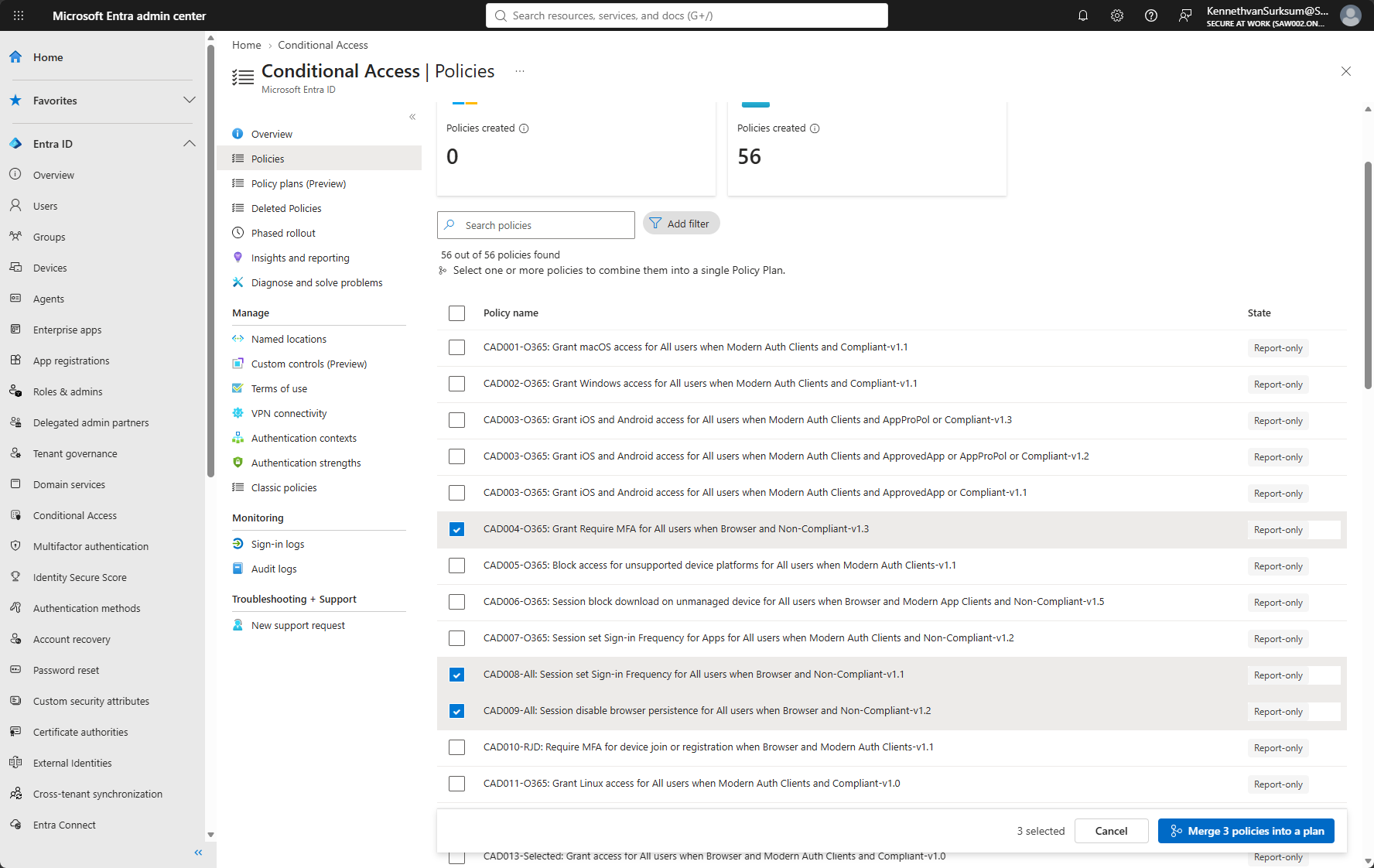
In Microsoft Entra admin center, open Entra ID > Conditional Access > Policies. Select the related policies and choose “Merge 3 policies into a plan”. The screenshot below shows CAD004, CAD008 and CAD009 selected. All three original policies are in Report-only state in this tenant.
Step 2 — Review the new plan and inherited conditions
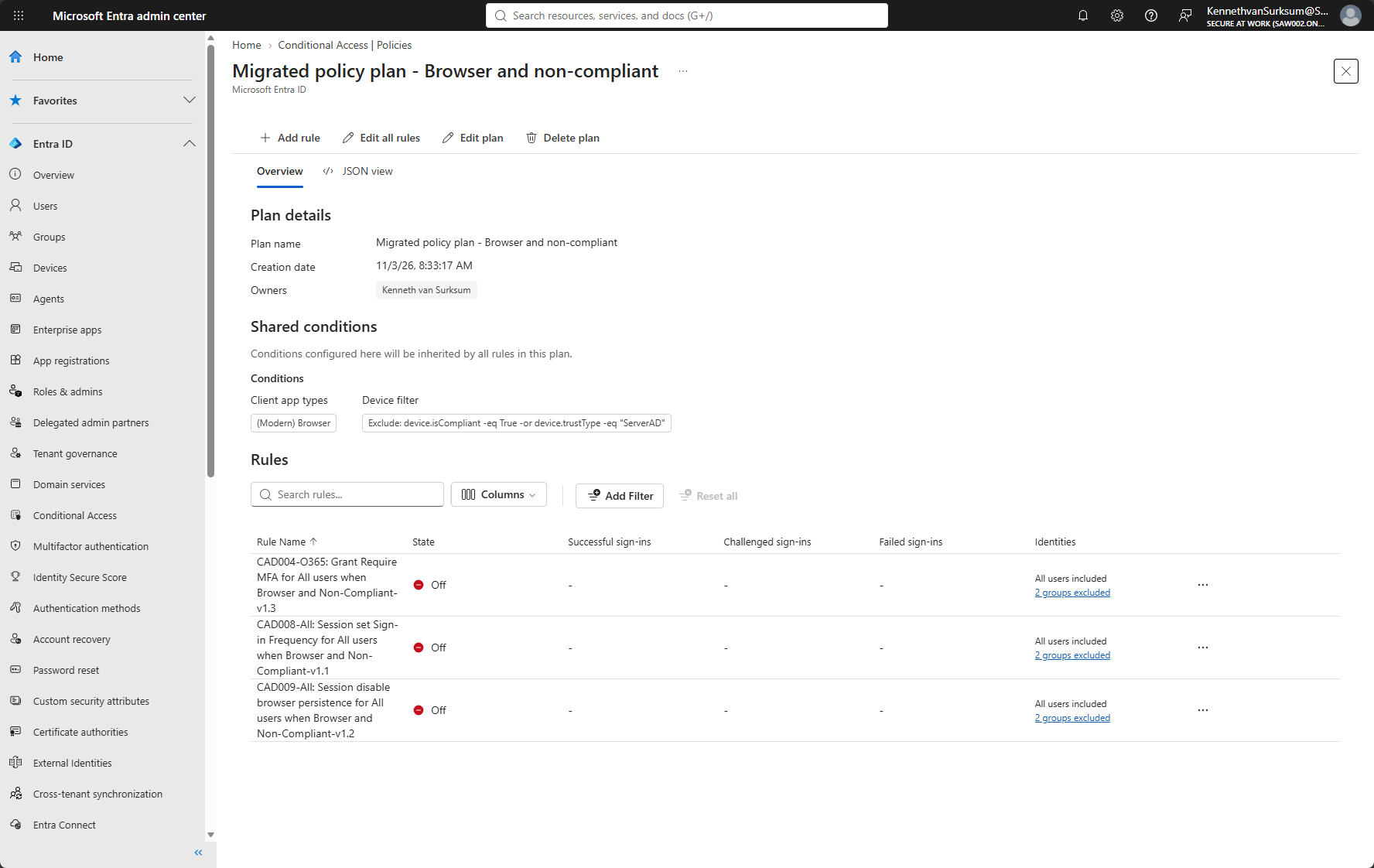
The generated plan was named “Migrated policy plan – Browser and non-compliant”. The wizard created one rule for each selected policy and automatically recognised two common settings: client app type “(Modern) Browser” and a device filter excluding devices that satisfy the filter expression below.
Exclude: device.isCompliant -eq True -or device.trustType -eq "ServerAD"This is the actual filter visible in the test; it should not be simplified to a generic “unmanaged device” label without reviewing how the expression behaves. The new rules were created in the Off state. No sign-in result is demonstrated by this screenshot.
Step 3 — Examine what the wizard did not move
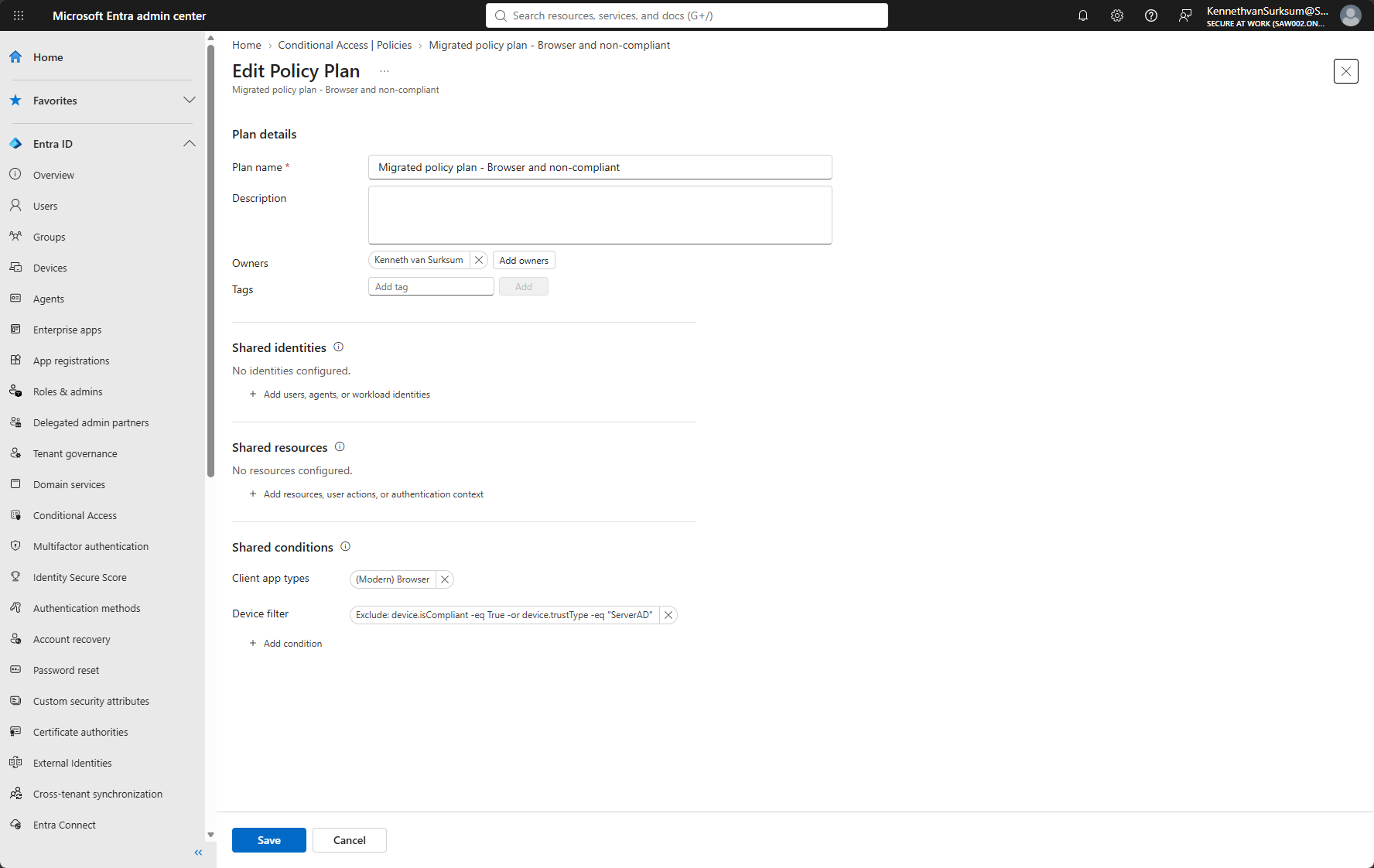
Opening Edit plan shows no shared identities and no shared resources. That is consistent with the example: the rules include “All users”, which cannot be configured at plan level, and their protected resources are not identical. Only the browser condition and device filter were promoted to shared conditions.
At this point, the shared break-glass exclusion had not been configured. This matters because an administrator might expect that an exclusion appearing in all original policies would automatically be moved into the plan. It was not in this test.
Step 4 — Add the break-glass exclusion at plan level
I manually added the AAD_UA_ConAcc-Breakglass group as an excluded group in the shared plan configuration. Now all three rules inherit that exclusion. This is the point where the benefit became more tangible: if another rule is added to this plan later, it inherits the same shared exclusion without requiring an additional policy-level assignment.
Notice that the rules in the resulting screenshot still display “2 groups excluded”. The screenshot does not identify those two groups, so it would be wrong to assume that every original exclusion was removed automatically. The exact rule-level exclusions still need to be reviewed for duplication and for rule-specific exceptions.
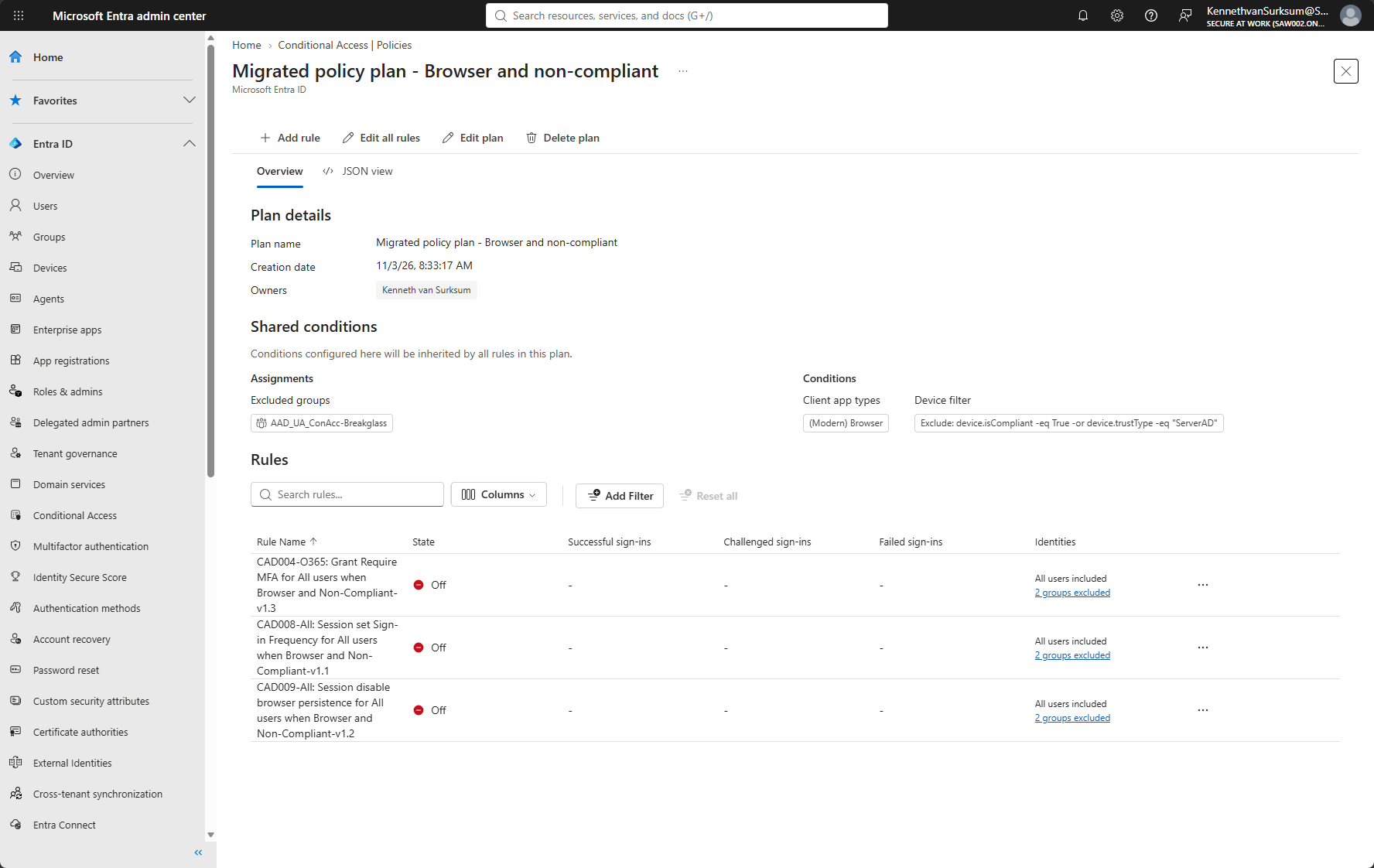
Step 5 — Validate before enabling anything
Creating a plan does not migrate enforcement automatically. Microsoft leaves new rules Off, and the original policies are unchanged. The safe sequence is to review inherited and rule-level settings, switch the new rules to Report-only, compare sign-in results against the originals, and only then consider enabling the new rules and disabling the old policies.
Inspect every rule: included users, remaining exclusions, protected resources, controls and session settings.
Set the new rules to Report-only and compare results using sign-in logs and Conditional Access impact reporting.
If results are equivalent, enable the new rules using change management and disable the original policies only after validation.
Retain the original policy exports and a documented rollback path. Delete original policies only when your retention requirements allow it.
Microsoft describes this process in “Migrate Microsoft Entra Conditional Access policies to a policy plan (preview)”.
5. What did this migration actually improve?
For these three policies, the wizard automatically centralised the browser client type and the device filter. I then manually centralised the common break-glass exclusion. The three controls still exist as three independent rules; their different resource targeting remains at rule level.
| What changed? | Observed result |
|---|---|
| Number of enforcement scenarios | Still three independent rules. |
| Shared client app condition | Moved to plan level automatically. |
| Shared device filter | Moved to plan level automatically. |
| Break-glass group exclusion | Added to plan manually. |
| Rule-level exclusions | Still shown in the rule summaries; exact memberships require inspection. |
| Resource assignments | Remain rule-specific; CAD004 and CAD008/009 target different resource scopes. |
| Original policies | Unaffected by creation of the plan. |
The most important saving is not the initial setup. The saving appears during subsequent changes: when a shared condition needs updating, it can be changed once rather than three times. On the other hand, a mistake in that shared setting can also affect all three rules at the same time.
6. When to use policy plans — and when not to
Good candidates
Policies with the same security objective and genuinely identical client-app, device, location or identity conditions.
Large rule sets that use the same protected applications or employee groups, but have different controls or network scopes; Microsoft specifically mentions Global Secure Access scenarios.
When standalone policies are the better choice
Rules with different emergency or operational exceptions. A plan-level exclusion applies to every rule and cannot be overridden.
Tenants where existing automated export, deployment, backup and drift-detection systems do not yet support policy plan objects and inherited conditions.
A group of only two or three simple policies whose common settings rarely change; the administration benefit might not justify a migration.
7. Limitations and design considerations
Plan-level exclusions affect every rule
A shared exclusion is powerful precisely because a rule cannot override it. Avoid grouping policies just because they carry the same prefix (CAD, CAL, CAP or CAU). For example, a temporary exclusion for device-code authentication may be appropriate for that specific rule but not for legacy authentication or unrelated policies.
All users and All resources have to remain at rule level
In the current preview, “All users” is not offered as a shared plan-level assignment, and “All resources” must be selected at rule level. This explains why even an apparently uniform set of policies may retain substantial rule-specific configuration.
Location-based restrictions deserve extra caution
Microsoft documents that, during preview, policy plans targeting users with a Location condition are issued one-hour access tokens without an instant IP enforcement check. The effect and relevance must be assessed before moving location-sensitive access restrictions into plans.
Plans are not a replacement for testing
Policy plan rules and standalone policies are evaluated independently. If both are enabled, both apply. Report-only testing and sign-in log comparison are essential; the migration wizard does not prove equivalent runtime behaviour just by generating a plan.
Automation and version control need to support the new object model
The Microsoft Graph documentation exposes separate endpoints for policy plans and their rules under the /beta API. Microsoft warns that beta APIs are subject to change and are not supported for production applications. For organisations managing multiple tenants from version-controlled configurations, this is a practical reason to validate tooling support before adopting plans broadly.
See Update conditionalAccessPolicyRule – Microsoft Graph beta.
8. Recommendation for an existing CA baseline
My current approach would be selective. I would keep the existing standalone baseline as the production reference until plan export, import, comparison, recovery and drift detection have been proven to work with the new objects. In the meantime, the migrated browser plan is a useful test case because it has obvious shared conditions and three different controls.
For new plans, I would use the following design rule: put a setting at plan level only when it should apply to every rule, including future rules. Anything that is an exception, or that could reasonably diverge later, should remain rule-specific.
I would also keep the existing policy identifiers (CAD004, CAD008 and CAD009) in the rule names. A plan adds a grouping layer; it does not remove the value of a consistent policy naming and versioning strategy.
9. Summary
Conditional Access Policy Plans solve a configuration management problem: they reduce the need to repeat common assignments and conditions across related policies. They do not introduce a different enforcement engine or eliminate the individual rules.
My test with CAD004, CAD008 and CAD009 made that difference clear. The wizard centralised the browser and device-filter settings, while I had to add the break-glass exclusion to the plan manually. The resource assignments and the controls remained at rule level, where they belong.
For environments with many related policies and frequent shared changes, that is useful. For a mature Conditional Access baseline already managed through automation, the advantage may be smaller. During preview, the additional management model, rule-level exceptions and documented limitations are good reasons to adopt Policy Plans carefully rather than migrating everything simply because the feature is available.
10. References
What are Microsoft Entra Conditional Access policy plans? (preview)
Create a Microsoft Entra Conditional Access policy plan (preview)
Migrate Microsoft Entra Conditional Access policies to a policy plan (preview)
Conditional Access baseline for October 2025 – Kenneth van Surksum (GitHub)
Microsoft Intune Application Deployment Best Practices – Modern Workplace Blog
Editorial note: The screenshots document a specific test on 3 November 2026. The state shown is Off for the new rules; the screenshots do not demonstrate enabled enforcement or completed sign-in validation.