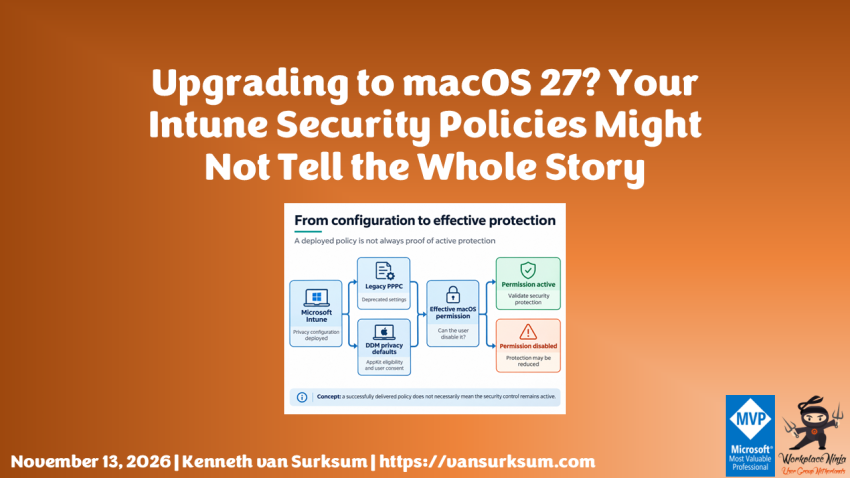
While preparing our Microsoft Intune configuration policies for macOS 27, we noticed that several privacy-related settings used by Microsoft Defender for Endpoint (MDE) were marked as deprecated in the Settings Catalog. Since these settings are important for the functionality of our endpoint security solutions, I wanted to understand what this meant and whether we needed to change our configuration before upgrading our managed Macs.
Apple has been moving more device management functionality towards Declarative Device Management (DDM), so that seemed like the logical place to look for a replacement. And indeed, Apple introduced a new approach for managing application privacy permissions through DDM, allowing organizations to configure default permissions for supported applications.
However, after investigating the new configuration options and testing them with Microsoft’s security components, things turned out to be more complicated than simply moving our existing settings from PPPC to DDM.
One of the important changes in macOS 27 is that users can disable certain permissions previously granted through device management. This means that our configuration profiles can still be installed, while the applications relying on those permissions might no longer have the access they need.
For an ordinary application, this could result in missing functionality. But when we’re dealing with Microsoft Defender for Endpoint and Microsoft Purview Endpoint DLP, the consequences could be more significant. Certain protection mechanisms depend on these permissions, and disabling them can affect the security controls we expect to be enforced.
What makes this particularly interesting is that Microsoft has documented this behavior for both Purview Endpoint DLP and Defender for Endpoint Device Control. Apple’s new DDM privacy management model also has an AppKit requirement, which raises questions about whether Microsoft’s current security components fully support the replacement functionality.
That leaves us with a practical question: Should we continue deploying macOS 27 to our managed devices, or would it be better to postpone the upgrade until we have more clarity about these security implications?
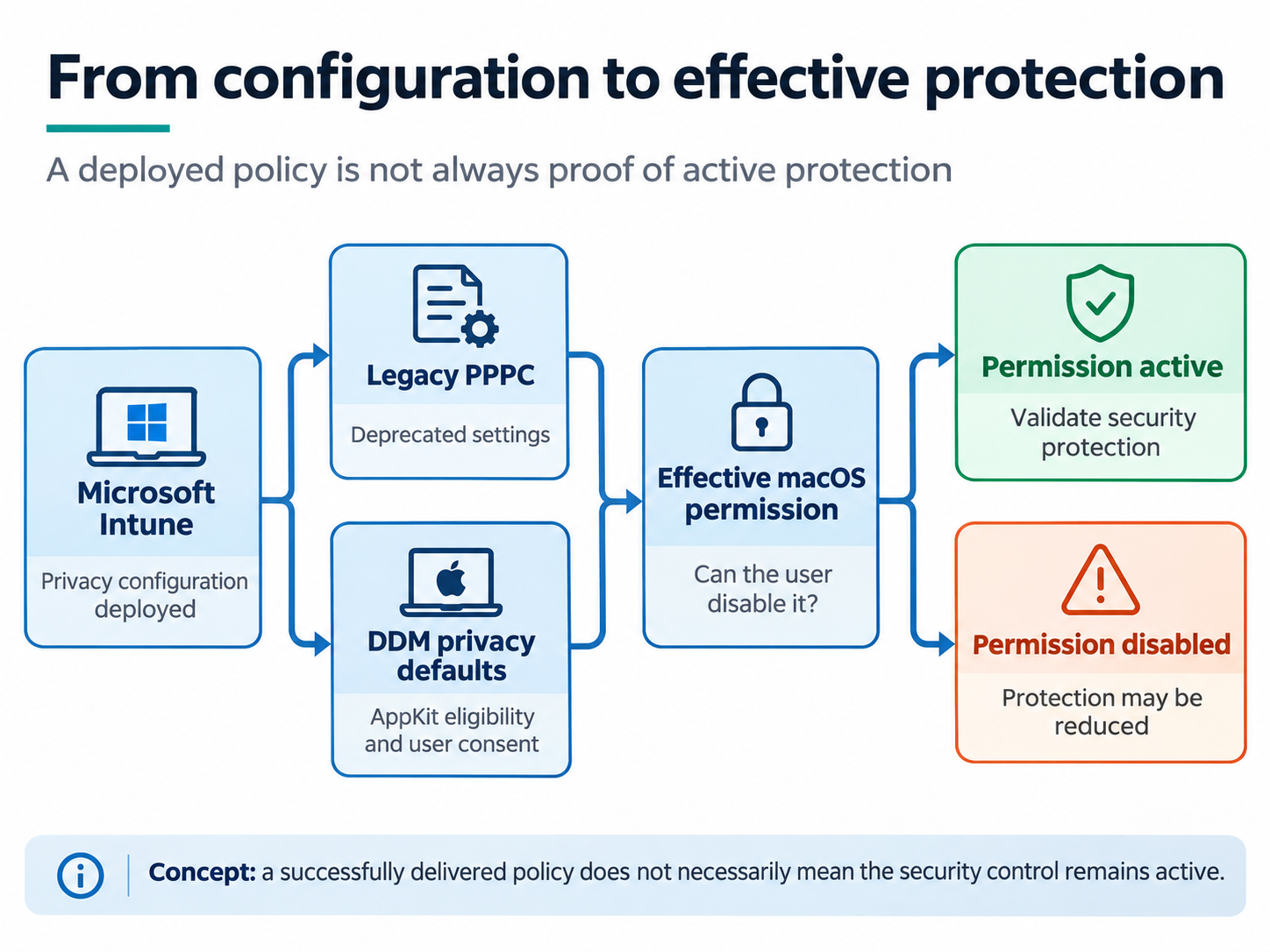
Table of contents
- Why are our privacy settings marked as deprecated?
- What changes with privacy management in macOS 27?
- Can we replace our existing PPPC configuration with DDM?
- What does this mean for Microsoft Defender and Purview?
- What did our investigation reveal?
- What can we do to maintain our security controls?
- Should we postpone upgrading to macOS 27?
- How much time do we have with a 90-day deferral?
- Summary
- References
Why are our privacy settings marked as deprecated?
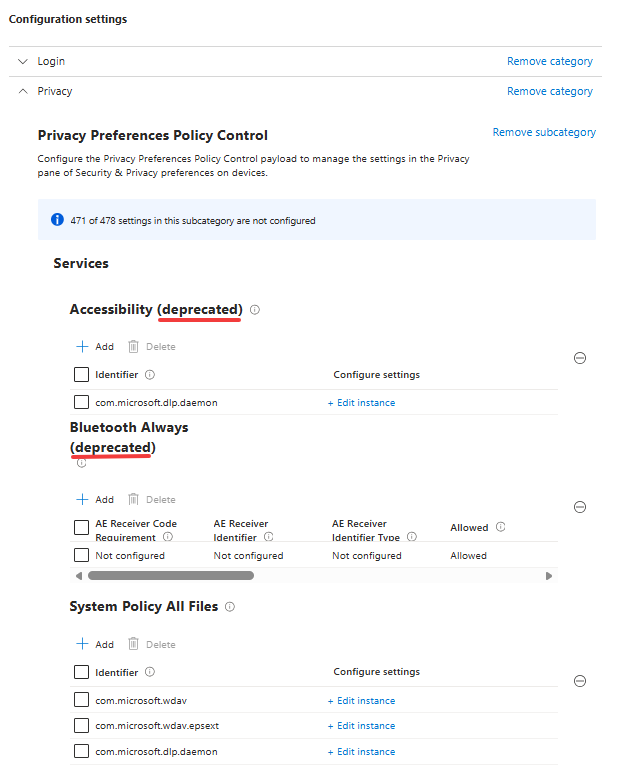
Historically, we’ve been able to configure many application privacy permissions through Privacy Preferences Policy Control (PPPC), using configuration profiles deployed through Microsoft Intune. These profiles allow us to manage access to privacy-sensitive operating system functionality, including Accessibility, Bluetooth and Full Disk Access, depending on which permissions Apple allows administrators to configure.
For Microsoft Defender for Endpoint, these configurations are particularly important because different components require access to specific operating system resources. Microsoft Purview Endpoint DLP also relies on permissions to determine which browsers, applications and files are involved in user activity, allowing it to enforce policies intended to prevent sensitive data from leaving the organization.
While reviewing our macOS 27 configuration policies in Microsoft Intune, we noticed that several settings were marked as deprecated. Looking into Apple’s documentation confirmed that this is part of a broader change to the way macOS manages application privacy permissions.
Apple identifies several services in the traditional com.apple.TCC.configuration-profile-policy payload as deprecated in macOS 27, including Accessibility and Bluetooth. It also points administrators towards the new Privacy configuration available through com.apple.configuration.app.settings.
Not every PPPC permission is affected in the same way, so I wouldn’t interpret these changes as the complete removal of the PPPC framework. However, for the permissions that are affected, we need to understand whether the configuration still provides the administrative control we expect.
One particularly important example is Accessibility. Apple documents that macOS 27 notifies users when an application receives Accessibility access through the deprecated management configuration and allows them to disable that permission afterwards, even if it was originally granted through MDM.
This is a significant change, especially for applications that depend on that permission to provide security functionality.
See Apple’s PrivacyPreferencesPolicyControl.Services and What’s new for enterprise in macOS 27.
What changes with privacy management in macOS 27?
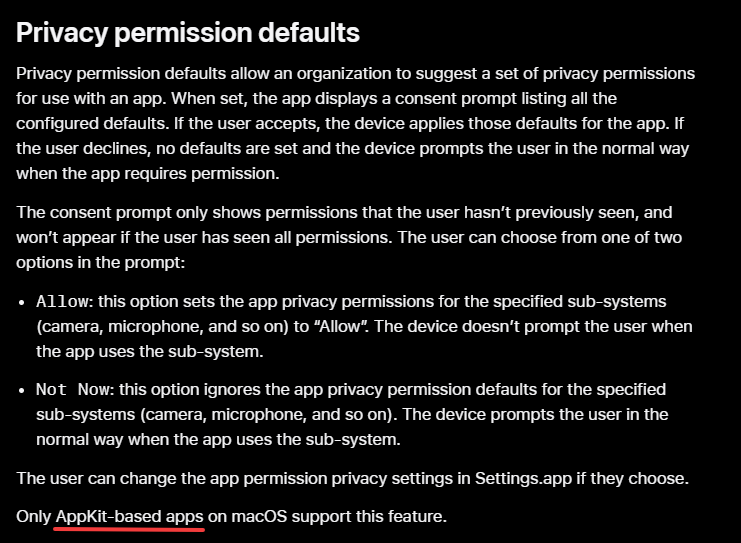
Apple introduced a new privacy consent experience that allows organizations to configure default application permissions through Declarative Device Management. Rather than relying exclusively on traditional PPPC configuration profiles, administrators can now use the Privacy settings in the com.apple.configuration.app.settings declaration.
The new approach allows organizations to suggest permissions for supported applications, together with a justification explaining why those permissions are required. When the application requests access, macOS can present a consolidated consent dialog that identifies the organization and the application, explains the requested permissions and allows the user to accept the suggested configuration.
I think the justification is a useful improvement from a user-experience perspective, since users get more information about why an application requires access to certain resources. However, the important difference is that these permissions are now part of a consent-based model.
Users can decline the suggested permissions and can change them again afterwards through System Settings.
This means that configuring a privacy permission through DDM doesn’t automatically guarantee that the permission will remain enabled. Even if an application receives the required permission initially, the user may be able to disable it later.
For applications that require access to sensitive resources, this changes how we need to validate their configuration. It is no longer sufficient to check whether the management profile has been installed successfully. We also need to determine whether the permission is active and, more importantly, whether the application is still providing the functionality that depends on it.
Apple describes the new behavior in AppSettings.
The AppKit requirement
Another interesting detail in Apple’s documentation is that the new privacy consent functionality on macOS currently supports AppKit-based applications only.
This is important because not every application component installed on a Mac uses AppKit. Security solutions often rely on background agents and daemons, which may use a different application architecture than traditional graphical applications.
Consequently, we cannot automatically assume that an application currently using a PPPC configuration will support the new DDM privacy consent mechanism.
And that is exactly where our investigation became interesting.
Can we replace our existing PPPC configuration with DDM?
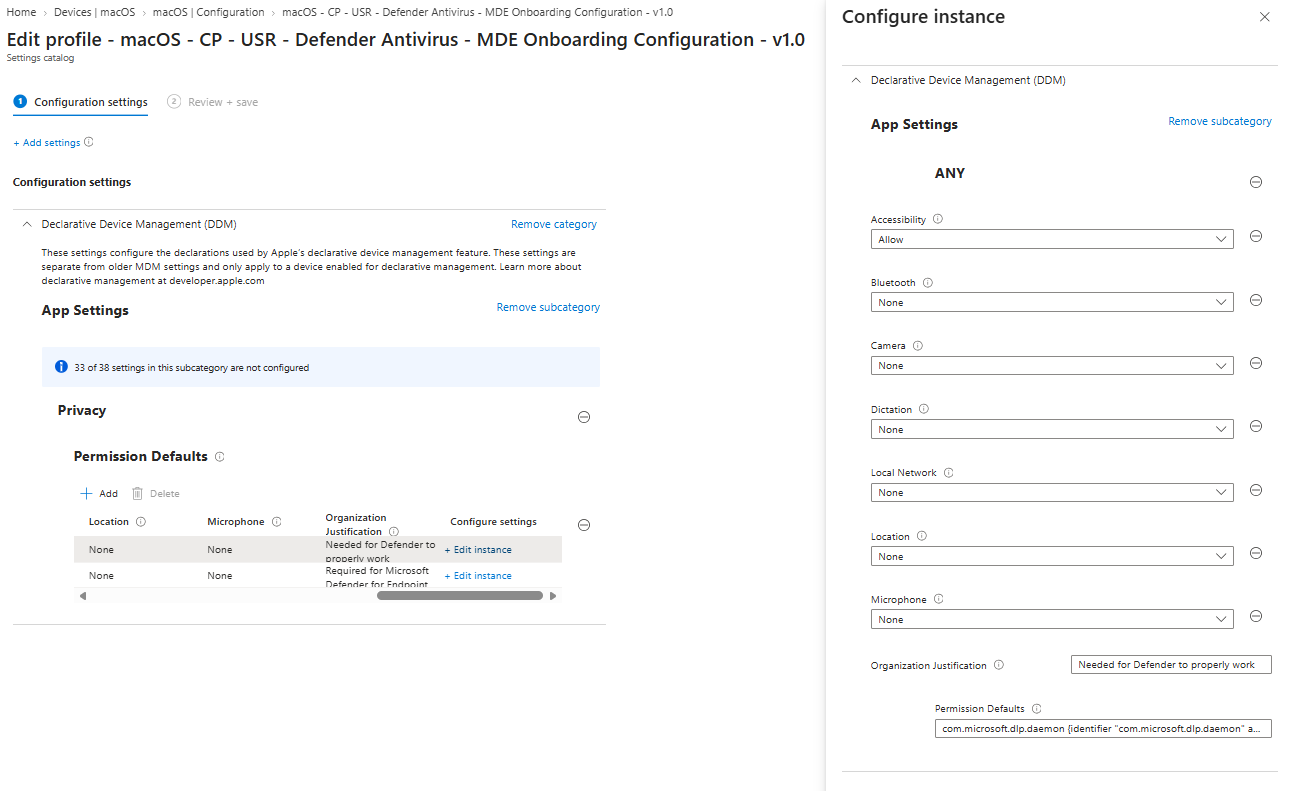
Since the traditional PPPC settings were marked as deprecated and Apple recommends using DDM Privacy settings instead, I initially expected that we could configure the equivalent permissions through the Intune Settings Catalog.
Microsoft Intune supports Apple’s App Settings declaration, which can be configured under Declarative Device Management. This allows administrators to configure supported declarative application settings on supervised devices running macOS 27 or later.
See Microsoft’s App settings configuration for Apple devices.
We therefore started investigating whether the required Microsoft Defender and Purview privacy permissions could be configured through DDM, rather than continuing to depend entirely on the traditional PPPC profiles.
During testing, we managed to get a DDM declaration accepted by macOS. However, that didn’t establish that the Microsoft DLP component had actually obtained the required permission through Apple’s new privacy consent model.
This is an important distinction. A valid DDM declaration confirms that the operating system has accepted the configuration, but it doesn’t necessarily confirm that the targeted application supports the functionality or that the effective privacy permission has been granted.
We investigated the Microsoft DLP components further, particularly in relation to Apple’s AppKit requirement. Based on those findings, we suspect that the current application architecture may not yet fully support Apple’s new DDM privacy consent mechanism.
However, this remains a hypothesis. We have not received confirmation from Microsoft that the relevant components are incompatible, nor have we established that rewriting a component to use AppKit would be the only solution.
I would therefore be careful about presenting DDM as a fully supported replacement for every existing Microsoft Defender or Purview PPPC configuration until the application compatibility and expected permission behavior have been confirmed.
More importantly, even if the applications become compatible with Apple’s new consent mechanism, this doesn’t automatically restore the previous enforcement behavior. Apple’s documentation explicitly allows users to change the permissions after accepting them.
What does this mean for Microsoft Defender and Purview?
There are two documented scenarios that I think deserve attention when preparing a macOS 27 deployment. Although both relate to Microsoft’s endpoint security components, they affect different protection mechanisms.
Microsoft Purview Endpoint DLP
Microsoft Purview Endpoint DLP uses macOS permissions to identify the browser, website, application and file involved in certain user activities. This information allows Endpoint DLP to evaluate policies and determine whether activities such as uploading sensitive documents or copying information into a browser should be allowed, audited or blocked.
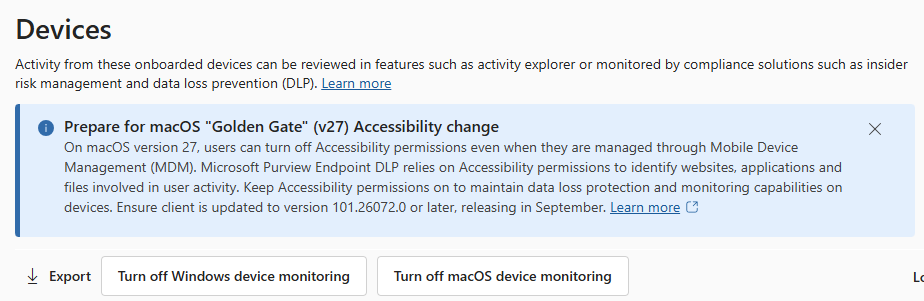
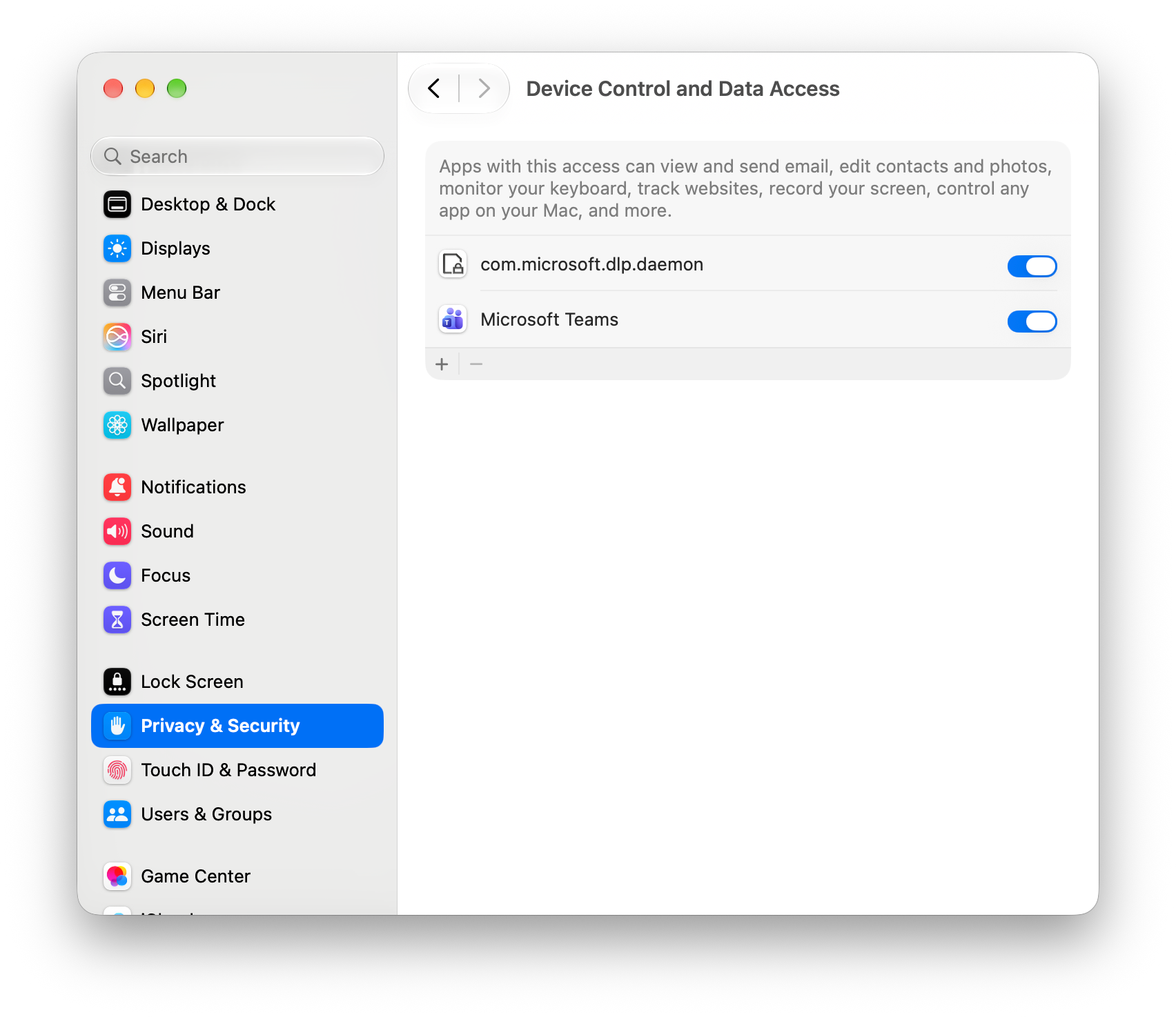
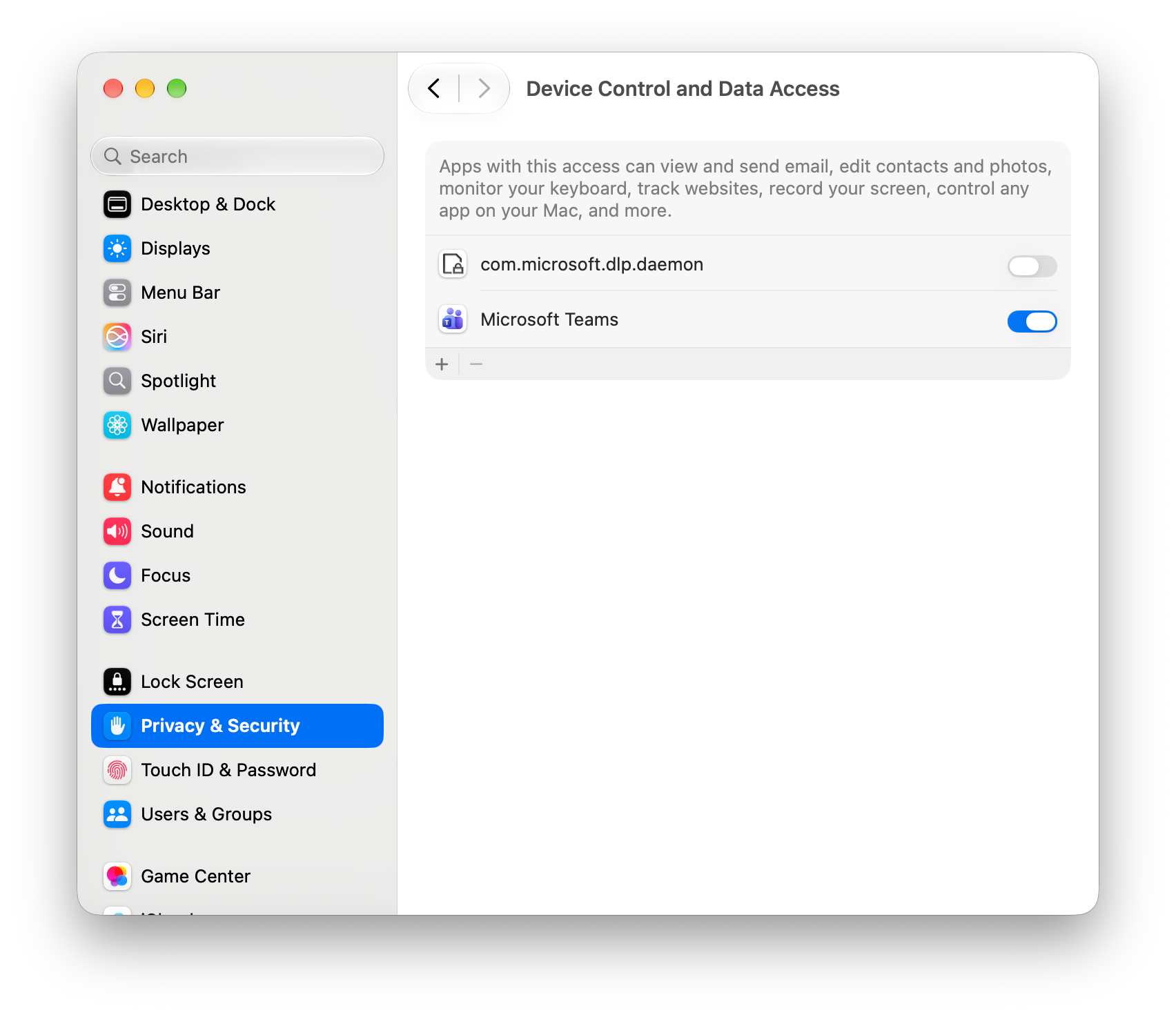
Before macOS 27, the relevant browser visibility functionality used the Accessibility permission. In macOS 27, Microsoft identifies the corresponding permission under System Settings → Privacy & Security → Device Control and Data Access.
Microsoft documents that users can disable this permission even when it was initially configured through MDM. When that happens, Endpoint DLP can no longer obtain URL and browser context for supported non-Edge browsers, including Safari, Chrome and Firefox.
This can affect policies that rely on knowing which website or browser is involved in an activity.
Fortunately, Microsoft has documented additional protection settings for situations where the required browser context is unavailable. The configuration includes restricted protection modes for cloud uploads and paste-to-browser activities, allowing administrators to determine whether additional protection should be enforced, audited or disabled.
The available modes are Enforce, Audit and Off, with Enforce documented as the default.
I think this is an important addition, since it acknowledges that we can no longer assume the required privacy permission will always remain enabled. Rather than relying entirely on the permission being present, Endpoint DLP can apply additional protection when the browser context becomes unavailable.
However, we still need to validate the actual behavior in our environment, particularly where we use policies intended to prevent sensitive information from being uploaded to specific websites or cloud services.
Microsoft provides the details in Microsoft Purview Endpoint DLP changes in macOS 27, which requires Endpoint DLP client version 101.26072 or later.
Microsoft Defender for Endpoint Device Control
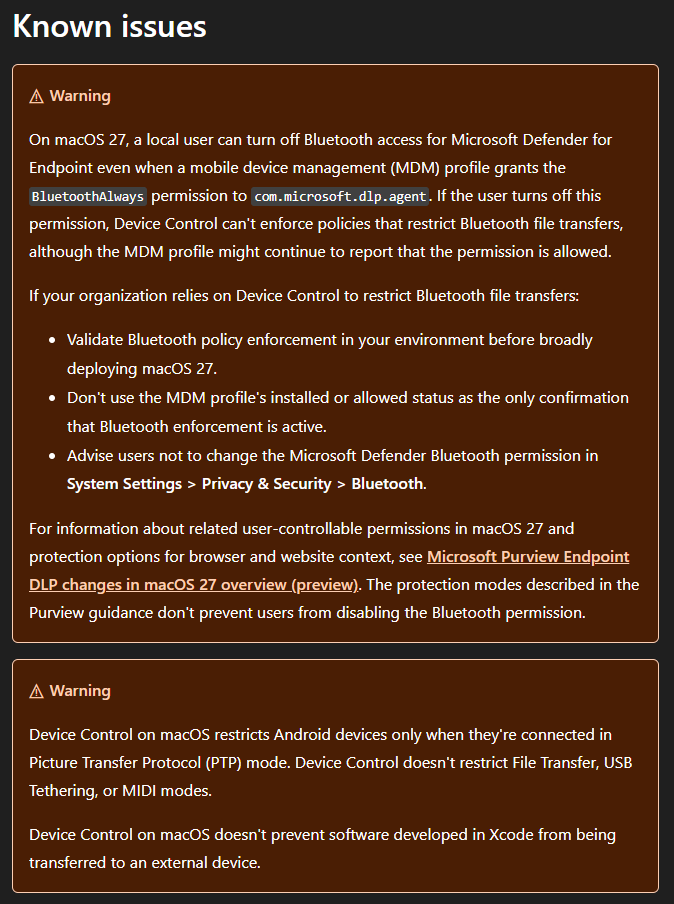
A similar issue exists with Bluetooth permissions used by Microsoft Defender for Endpoint Device Control.
Microsoft documents that users running macOS 27 can disable Bluetooth access for com.microsoft.dlp.agent, even when an MDM configuration profile grants the BluetoothAlways permission.
When the permission is disabled, Defender Device Control can no longer enforce policies that restrict Bluetooth file transfers, although the management profile may continue reporting that the permission is allowed.
This is particularly relevant for organizations that use Device Control to restrict unauthorized transfers of corporate information through Bluetooth-connected devices.
What makes this concerning is the difference between the reported configuration and the effective protection. From an Intune perspective, the required configuration might appear to be installed, while the user has disabled the permission necessary for the restriction to work.
Microsoft explicitly documents this as a known issue in Microsoft Defender for Endpoint Device Control for macOS.
Unlike the Purview browser-context scenario, the restricted protection modes described by Microsoft for Endpoint DLP do not address the Bluetooth Device Control issue. Microsoft recommends validating actual Bluetooth enforcement and advising users not to change the required permission.
In my opinion, that is worth considering before broadly upgrading managed Macs to macOS 27, particularly in environments where restricting Bluetooth file transfers is an important part of the security baseline.
What did our investigation reveal?
Our investigation started with the deprecated privacy settings in the Intune Settings Catalog and led us towards Apple’s new DDM privacy consent functionality. Since DDM is the direction Apple is moving towards, I expected that the relevant settings could be migrated without significantly changing how the endpoint security applications behave.
However, the new privacy model introduces two important considerations.
First, Apple’s new privacy consent mechanism requires application support, including the documented AppKit requirement. We investigated the Microsoft DLP components and found indications that their current implementation may not yet fully support this model. That is something I would like Microsoft to clarify, particularly regarding the expected migration from traditional PPPC configurations.
Second, and perhaps more importantly, the new privacy model allows users to change certain permissions after they have been configured through device management.
This means that even if Microsoft updates its applications to support the new DDM configuration, it doesn’t necessarily solve the underlying challenge of maintaining the required permissions.
In the case of Microsoft Purview Endpoint DLP, Microsoft has already documented how the product responds when browser context becomes unavailable. For Defender Device Control, Microsoft documents that disabling Bluetooth access can prevent the relevant restrictions from being enforced.
These findings demonstrate why validating the actual behavior of our security controls is becoming increasingly important. A policy that reports successful deployment doesn’t necessarily mean the application still has the permissions it needs, and an application that reports healthy doesn’t automatically prove that every protection scenario is working.
For me, the main question is no longer simply whether we can configure a particular permission using Intune. It’s whether we can maintain the intended security protection when that permission is controlled by the user.
What can we do to maintain our security controls?
For now, I wouldn’t recommend replacing all existing Microsoft Defender and Purview privacy configurations with DDM simply because the corresponding PPPC settings are deprecated.
Instead, I would continue using Microsoft’s documented configurations while validating how those settings behave on macOS 27. We should also monitor Microsoft’s documentation for updates to the supported deployment methods and application behavior.
For Microsoft Purview Endpoint DLP, I would verify that the supported client version is installed, confirm the status of the Device Control and Data Access permission, and review the restricted protection modes. Where appropriate, I would keep the additional protection enabled so that losing browser context doesn’t silently result in the complete loss of the corresponding DLP controls.
For Microsoft Defender Device Control, I would specifically validate Bluetooth file-transfer restrictions if the organization depends on them. This should include testing whether the restrictions continue working after the user changes the Bluetooth permission, rather than relying exclusively on the installed state of the Intune configuration profile.
I would also include these checks in our macOS deployment-ring validation process. When a major operating system release changes how privacy permissions are handled, we need to verify the actual security functionality in addition to application compatibility and operating system stability.
Until Microsoft provides further clarity about the intended DDM migration path, I think organizations should be careful about assuming that the new privacy configuration provides the same level of control as the previous implementation.
Should we postpone upgrading to macOS 27?
Based on the findings described above, I think there is a reasonable argument for postponing the production deployment of macOS 27, particularly for organizations that depend on the affected Microsoft Defender or Purview functionality.
This doesn’t mean that macOS 27 is generally insecure, or that every organization should delay upgrading. The impact depends on which security controls are being used and whether the documented limitations affect the organization’s security requirements.
However, if we rely on Microsoft Defender Device Control to restrict Bluetooth file transfers, and macOS 27 allows users to disable the permission required to enforce that restriction, we need to decide whether that risk is acceptable.
The same applies to Microsoft Purview Endpoint DLP, although Microsoft provides additional protection options for situations where the required browser context becomes unavailable.
Personally, I would prefer to have a confirmed mitigation and a validated configuration before deploying a major operating system upgrade that changes the behavior of security controls we rely on.
At the same time, postponing an upgrade isn’t without risk. We still need to keep devices updated with the security releases available for their currently supported macOS version, and we should regularly reassess the risks of remaining on an older operating system.
The decision should therefore be based on whether the affected functionality is part of our security requirements, whether the available mitigations are sufficient, and whether the current operating system can continue receiving the security updates we need.
For organizations that depend on these controls, temporarily postponing macOS 27 until the limitations have been evaluated and mitigated seems like a reasonable decision.
How much time do we have with a 90-day deferral?
One thing we need to consider is that Apple only allows major operating system upgrades to be deferred for a maximum of 90 days using the supported software-update deferral configuration.
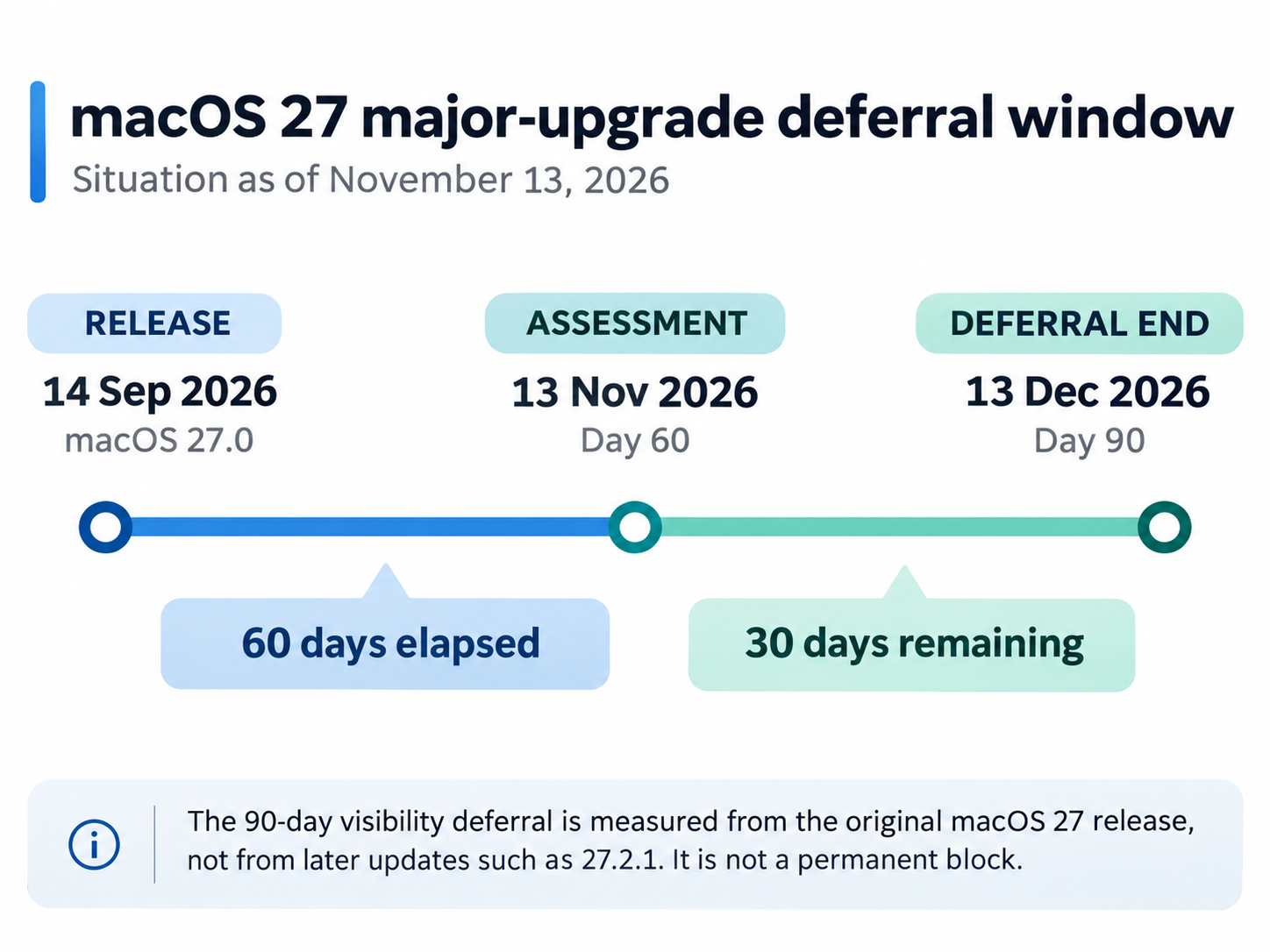
According to Apple’s security release information, macOS 27 was released on September 14, 2026.
If we configure a 90-day major-update deferral using MajorPeriodInDays = 90, the relevant dates are:
| Milestone | Date |
|---|---|
| Initial macOS 27 release | September 14, 2026 |
| Date of this article | November 13, 2026 |
| Days since release | 60 days |
| End of the 90-day period | December 13, 2026 |
| Remaining time | 30 days |
This means that, at the time of writing, we have approximately one month remaining before macOS 27 reaches the end of the maximum major-upgrade visibility deferral.
An important detail is that the deferral for the major upgrade relates to the original major release. The fact that Apple has subsequently released updates such as macOS 27.2.1 doesn’t restart the 90-day major-upgrade deferral period.
In other words, we shouldn’t assume that a newer maintenance update provides another 90 days to validate the original major operating system upgrade.
It’s also worth remembering that the deferral controls when a major upgrade becomes visible through Software Update. It doesn’t provide a permanent block against the installation of newer operating system versions, and Apple allows managed DDM enforcement to operate independently of configured deferrals.
Apple documents this behavior in Deploying software updates using declarative management.
What would I do with the remaining time?
I would use the remaining period to validate which Microsoft Defender and Purview functionality is affected by the privacy changes, determine whether the available protection modes are sufficient, and seek clarification from Microsoft about the expected DDM privacy configuration support.
If the affected security controls are important to the organization and no acceptable mitigation is available, I would consider postponing the production rollout while keeping devices on a supported and updated macOS release.
However, the 90-day deferral should not be considered a long-term solution. If the underlying compatibility or security issues remain unresolved beyond December 13, we need to reassess the available controls and the associated risks rather than assume that the update will remain hidden.
Summary
While reviewing our Microsoft Defender for Endpoint configuration policies in Microsoft Intune, we noticed that several privacy-related settings were marked as deprecated for macOS 27. Investigating these settings led us to Apple’s new DDM privacy consent functionality, which appears to be the intended direction for managing the affected permissions.
However, there are some important considerations. The new privacy consent model requires support from the applications involved and currently has an AppKit requirement on macOS. Based on our investigation, we suspect that some Microsoft security components may not yet fully support the new mechanism, although that has not been confirmed by Microsoft.
More importantly, Apple allows users to change certain privacy permissions that were previously configured through device management. Both Microsoft Purview Endpoint DLP and Microsoft Defender for Endpoint Device Control have documented scenarios where disabling such a permission can affect the security controls they provide.
For Purview Endpoint DLP, Microsoft has introduced protection modes to address situations where browser context becomes unavailable. For Defender Device Control, the Bluetooth limitation remains relevant for organizations that depend on restricting Bluetooth file transfers.
Personally, I think these findings are sufficient reason to carefully reconsider the timing of a macOS 27 deployment, particularly when the affected functionality forms part of our security baseline. Before broadly upgrading devices, I would want to confirm that our security controls continue working as expected and that the available mitigations provide an acceptable level of protection.
With macOS 27 having been released on September 14, 2026, the maximum 90-day major-update deferral reaches its end around December 13, 2026. At the time of writing, that leaves approximately 30 days to assess the impact and determine whether the production rollout can proceed.
Ultimately, the decision to upgrade should be based not only on whether our applications are compatible with macOS 27, but also on whether the security controls we depend on remain effective.
A successful Intune policy deployment doesn’t necessarily mean that a privacy permission remains active, and an active permission doesn’t automatically prove that the intended security protection is being enforced.
That is something I would make part of the validation process before approving macOS 27 for production deployment.
References
Apple documentation
- Apple security releases
- PrivacyPreferencesPolicyControl.Services
- AppSettings — Apple Developer Documentation
- What’s new for enterprise in macOS 27
- Deploying software updates using declarative management